A 3D visualization multiplex is a system to instantly visualize 3D models on multiple devices: desktop computers, smartphones, tablets, augmented reality gear, and virtual reality glasses.
It's an everyday tool to streamline conversations between architects, engineers, contractors, their clients, and the rest of the world.
With the formidable combination of CAD software programs - e.g. SketchUp or Revit - and a multiplex, 3D storytelling has never been simpler.
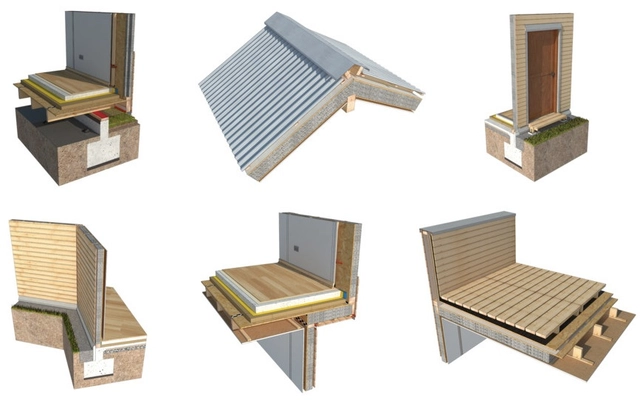
Developed by the POLOMADERA Program at the University of Concepción, the 3D Building Construction Solutions Catalog is a free tool that helps users design construction details for lightweight wooden structural systems.
Though created with the intention of meeting new standards soon to be implemented nationally in Chile (and therefore in Spanish), the catalog was developed jointly with international experts from the Wood Construction Institute at the Holzbau Institut in Germany, and thus incorporates best practices that are applicable around the world.
The catalog allows users to find and download different construction solutions in wood, with details categorized under Foundations, Mezzanines, Doors and Windows, Partitions, Roofs, and Terraces.
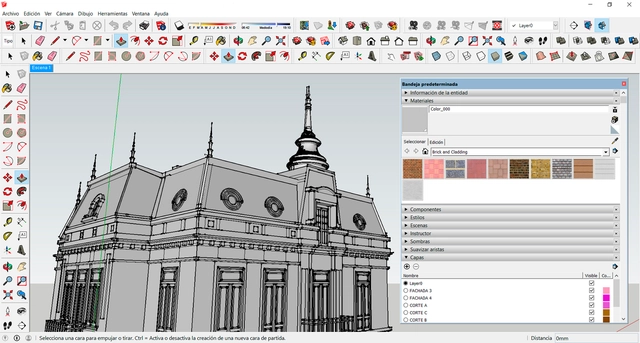
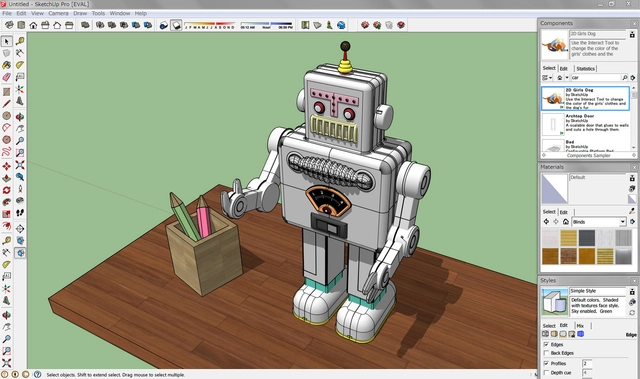
For decades, SketchUp has been one of the most well-known 3D modeling programs in the design world, owed to its intuitive working tools and labyrinth of user-generated accessories, from open source libraries to plugins. Quite often, SketchUp is the software of choice for engaging children with architecture, due to its availability, flexibility, and ease of use.
Later in your design career, you could be forgiven for dismissing SketchUp as a 'rookie tool', a beginner's level below the advanced stages of Revit, Rhino, and AutoCAD. However, as SketchUp has evolved throughout the years, it now contains a formidable array of functions, capable of producing complex, exportable results in an organized, efficient manner for students and senior partners alike.
From geo-location to sun-paths, here are 10 very useful tips to make you the model SketchUp user of the office.
After the success of its 6th edition in 2007, Sketchup became one of the world's most widely used 3D modeling software products. This is thanks to its intuitive toolbar, interdisciplinary use within the creative industry (not just architects) and having a free version that doesn't use watermarks.
Its open source library helped the software to provide a wide range of 3D objects, while hundreds of users developed their own plugins not only to solve the problems of each version but also to exploit the potential of their tools.
We’re going to introduce you to 10 of the plugins shared by Sketchup Tutorials Facebook page using their demonstrative GIFs. If you don’t know how to add a SketchUp plugin, don’t worry! You can learn in this video also posted by them.
SketchUp developer Trimble has launched SketchUp Viewer, a new virtual and mixed reality app for the Microsoft HoloLens that will allow users to inhabit and experience their 3D designs in a completely new way. Using the holographic capabilities of the HoloLens, SketchUp Viewer creates hologram versions of models that can be placed in real-world environments –allowing architects to study and analyze how their buildings will react to their context while still in the design stage.
At today’s Trimble Dimensions keynote, architect Greg Lynn presented SketchUp Viewer for the first time, demonstrating the technology using his re-imagining of the Packard Plant in Detroit, commissioned as part of the “Architectural Imagination,” the U.S. Pavilion at the 2016 Venice Biennale exhibition.
"Trimble mixed-reality technology and MicrosoftHoloLens bring the design to life and bridge the gap between the digital and physical. Using this technology I can make decisions at the moment of inception, shorten the design cycle and improve communication with my clients,” said Lynn.
The emergence of virtual reality applications for architecture has been one of the big stories of the past few years – in the future, we’ve been told, VR will become an integral part not just of presenting a project, but of the design process as well.
That future may now be upon us, thanks to new tool from New York City startup IrisVR. The company has released Iris Prospect, a program that enables you to send your plans and models directly into VR with a single click.
A beta version of the software is currently available for free download from their website, making VR accessible to anyone.
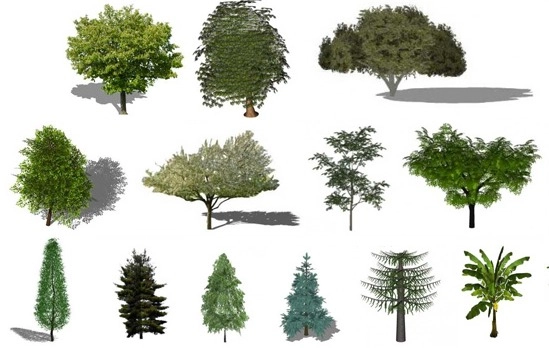
Are your animated shrubs looking a little tired? Has your digital flora dried up? Are you looking to remedy perennial render problems? Look no further: we've found a solution that will truly make your renders bloom. With the help of a botanist, OneCommunity, an open source software website, has released a list of the most realistic plants optimized for SketchUp. The archive includes everything from palm trees to an array of water and bog plants, bamboo shoots, and tropical evergreen trees. The best part? It's free.
It's time to breathe new life into your wilted renders. Find out how to make yours blossom after the break!
In a world where architects can use computers to produce representations of designs with new levels of accuracy and artistry, software fluency is becoming increasingly necessary. With that in mind, last month we asked our readers to help us develop a comprehensive list of tutorials. After studying the comments and scouring the internet for more sources, we have developed this improved list, which we hope will help you to discover new work techniques and better ways to apply different programs.
Of course, it's unlikely that any list of internet resources will ever be complete, so we're hoping to continually update this list with the web's best learning resources. If there are any tutorials sites we've missed which you found helpful, let us know in the comments!
In contemporary architecture practice, proficiency in an ever-widening array of architecture software is becoming increasingly important. For almost every job in the field, it is no longer enough to bring a skilled mind and a pencil; different jobs may require different levels of expertise and different types of software, but one thing that seems universally accepted is that some level of involvement with software is now a requirement.
While software has opened a huge range of capabilities for architects, it also presents a challenge: universities have taken wildly different approaches to the teaching of software, with some offering classes and access to experts while others prefer to teach design theory and expect students to pick up software skills in their own time. New architecture graduates therefore already face a divide in skills - and that's not to mention the many, many architects who went to school before AutoCAD was even an industry standard, and have spent the past decades keeping up with new tools.
The internet has therefore been a huge democratizing effect in this regard, offering tutorials, often for free, to anyone with a connection - as long as you know where to look. That's why ArchDaily wants your help to create a directory of the internet's best architecture tutorial websites. Find out how to help (and see our own short list to get you started) after the break.
Sefaira, the market-leading daylighting visualization tool, has just announced a new feature for their software plugins for AutodeskRevit and Trimble Sketchup. In addition to the real-time visualizations announced last year, the new update adds customizable, exportable graphics which offer both a point in time analysis or an annual overview, and analysis tools which help designers easily identify overlit and underlit spaces and review heating or cooling requirements.
Videos
Arrette Scale: perspective. Image Courtesy of Arrette Scale
Building upon our Top 10 Apps for Architects, this collection brings together some of the best quality and most valued technical apps for designing, sketching, calculating and collaborating. Although the majority of those featured here are designed solely for the iOS platform, every time we collate lists such as these it's clear that more and more high quality apps for the Android and Windows platforms are being developed. From condensed versions of large scale software packages that architects and designers use every day, to blank canvases to scratch ideas down onto, you might just find an app that could improve the way you work.
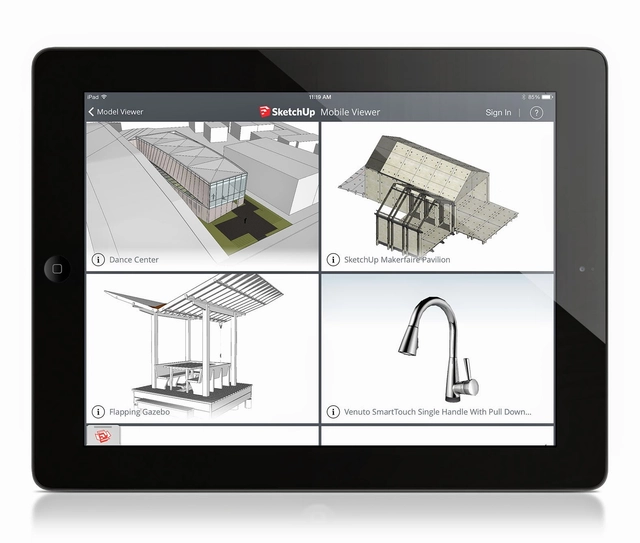
SketchUp have recently unveiled the latest app in their suite, SketchUp Mobile Viewer for iPad. Allowing "on the go" access to models, the app also features access to "the entire universe" of files in their 3D Warehouse. Users can use the same familiar features, such as Orbit, Pan and Zoom, to "present their own private 3D models to clients and partners." With a price tag of $9.99 from Apple's App Store, early reviews suggest that this is a good first step with some way yet to go. Being the first ever SketchUp tablet product (with a planned Android version in the works), it has been released in conjunction with SketchUp 2014 which incorporated BIM capabilities for the very first time.
Trimble Buildings Group have recently released SketchUp 2014, the latest version of its 3D modelling platform for architects, engineers, design and construction professionals. With "more than 30 million unique activations in the past year", SketchUp is claimed to be the most widely used 3D modeling software in the world today. The latest incarnation of the simple tool features a new 3D Warehouse and some interesting integrations into the world of Building Information Modelling (BIM).
When architects use SketchUp Pro as a tool for making more-accurate bubble diagrams, they create “rooms” whose areas match the ones in the program, group each one, and arrange them three-dimensionally. This is useful until one of the rooms changes size, which can throw off the whole process.
Hasbro, the makers of the Monopoly game, have officially announced a competition that gives Monopoly-lovers the chance to design a building that will be included in the new interactive game Monopoly City Streets.
This morning Google announced GoogleSketchUp 7.1. This new version will be a free upgrade for existing Pro users, and has emphasis on three important aspects of this easy-to-use (yet powerful and extensible) software: performance, an improved version of LayOut (2.1) and collaboration.
As for performance, the engine has been improved and you will notice that orbiting, zooming and drawing can be quicker and smoother in 7.1, for both PC and Mac editions.
LayOut 2.1, the SU componente that enables you to create presentation boards and design documents straight from your model, has now the ability to apply dimensions to scaled SU models and vector graphics. Based on my personal experience, LayOut is very good to deliver quick construction documents and has helped me a lot working with furniture manufacturers. The new dimension tool is something I was waiting for.
LayOut 2.1 also includes snap to the model, an improveed Freehand tool, lists (bullet or numbered, very useful) in the text area, improved grids and improved copy/paste, making it easier to work with other design softwares. You can see more on the video and images below.
This year we not only celebrate the 142nd birthday of Frank Lloyd Wright, but also the 50 years of the Guggenheim, one of his master pieces (completed the year he passed away). These dates are not only commemorated with Lego Kits and exhibitions, but also with a very interesting competition held by the Guggenheim Museum and Google Sketchup.
During the AIA Convention 2009 we had the chance to talk to different AEC software companies, to learn how they are helping architects. We decided to keep the conversation on the same interview format we have been using, so you can hear it straight from the developers.