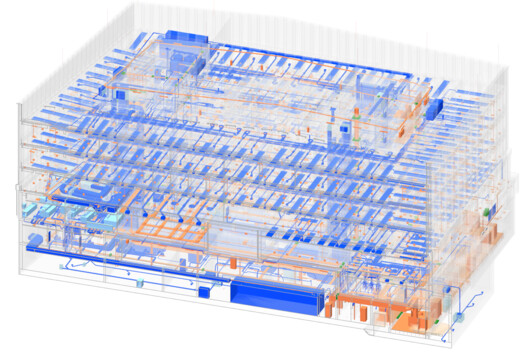
Building Information Modeling has made it possible to attach an enormous amount of information to each element of a design. A wall can carry its fire resistance class and its cost group, and later even the maintenance information a facility manager will need. That possibility creates a temptation: if the model can hold more data, it should. In the process, an important question of efficiency can get lost: does the project actually need this information, and does it need it now?
For architects, BIM is often described as a "single source of truth." Every additional property, however, adds work, coordination, and maintenance, and information entered too early or without a clear purpose can quickly become outdated. What matters is having the right information for the decisions being made at each stage of the project. The Stuttgart-based firm KUBUS360 made that question central to its work on an administrative complex in Baden-Württemberg (Germany).
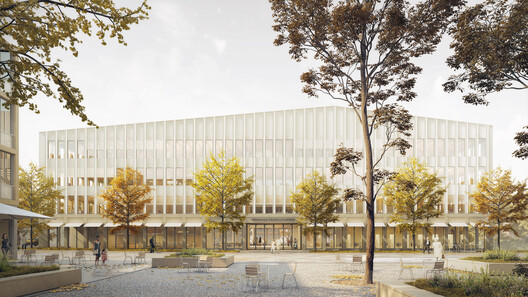
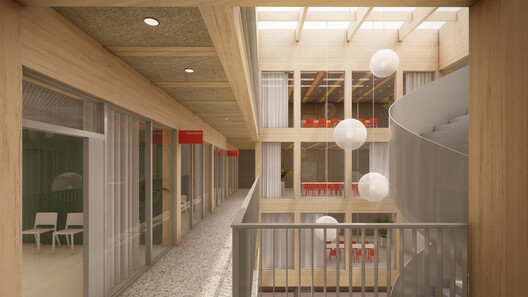
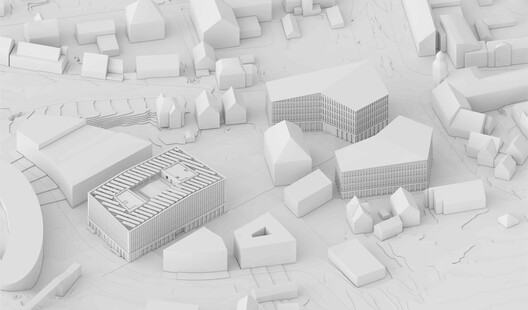
The project consists of three wood-concrete hybrid buildings, with public-facing ground floors and offices for roughly 630 workstations above. Known for a "360-degree" approach spanning planning, project management, and sustainability consulting, the firm developed what architect Bianca Hirner and BIM coordinator Freddy Hartmann call leanBIM. Working in Vectorworks Architect, they set out to keep the model detailed without letting it grow heavier than the project required.
Designing the Information Before Designing the Model
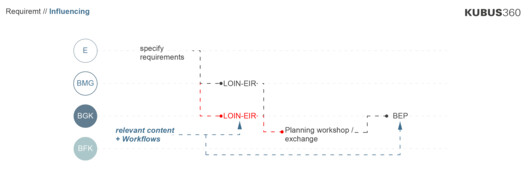
For KUBUS360, the BIM process begins before the first line is drawn. The client had limited experience with BIM, so instead of waiting for a long list of requirements, the team helped write the Employer's Information Requirements (EIR) and then built the BIM Execution Plan (BEP) from them. Hartmann explains:
We primarily aimed to incorporate only the information that would be evaluated later into the model.
This planning established the Level of Information Need (LOIN) matrix for the project, identifying every building component as an Industry Foundation Classes (IFC) entity while specifying the properties each element would need and the project phase when those properties would be added. Information entered the model as the design developed, rather than being attached all at once. The result was a lighter model with clearer responsibilities and fewer unnecessary data fields to manage.
One Source of Truth, Four Databases
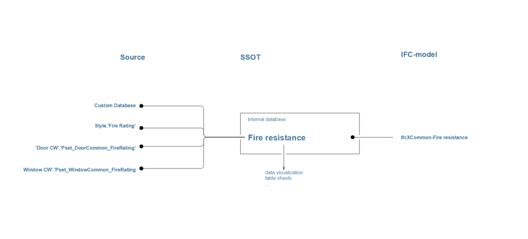
Keeping a model lean is partly a question of where information lives. KUBUS360 organized nearly the entire project around four centralized databases inside Vectorworks Architect: a general IFC database, a component database, a dedicated database for windows and doors, and a placeholder database for facility management information.
Through the Vectorworks Data Manager, elements inherit their fire resistance class and other shared properties from these datasets, and the same values feed visualizations, schedules, and IFC exports. As Hartmann says:
Thanks to the small number of databases, we know relatively quickly where the data is being entered.
Modeling Freely Without Losing BIM Intelligence
Most of the project, from stairs and railings to structural elements and doors, relies on native Vectorworks tools, which KUBUS360 says cover roughly 95 percent of the project's modeling work. Custom elements follow a different logic. KUBUS360 uses class-based assignment, where an object's IFC identity and properties come from its class rather than from the tool used to draw it.
A parapet can be modeled with a roof surface and still export with the correct cost group. A curved facade pilaster can begin as solid geometry, become an Auto Hybrid object, and carry the same data as any standard component. "The class-based approach is a key advantage for us in Vectorworks Architect, as it allows us to design shapes completely freely," says Hartmann.
Making Information Visible Instead of Hidden
Data becomes useful when architects can verify it visually. One of KUBUS360's workflows uses Data Visualization in Vectorworks Architect to color-code elements based on information stored in the model. Fire protection classes and other properties can be displayed instantly across the building, making inconsistencies visible without searching through schedules.
The team also developed an internal quality-control tool called the Angle Checker. Because polygonal geometries create many irregular angles, the tool shows at a glance which walls have been drawn correctly. Each element receives a simple true-or-false value through the Data Manager, allowing incorrect geometry to be identified immediately.
Information That Extends Beyond the Building
The question of "how much information is enough?" becomes even more relevant when BIM connects to data beyond the building itself. A second Vectorworks example shows how integration with ArcGIS can make geospatial information the foundation of a BIM workflow before architectural modeling begins. Parcels, roads, and existing site features can be streamed directly into a project through ArcGIS Feature Services, creating a geolocated site model from live GIS information instead of static imports.
Existing trees imported from GIS datasets, for example, can carry information about species or health condition and be color-coded through Data Visualization to distinguish which trees should be preserved, removed, or replaced across a site.
At an urban scale, BIM models can also contribute information back into GIS environments. Geolocated building models containing architectural, landscape, and infrastructure data can become part of broader ArcGIS web scenes used by planners, engineers, and facility managers. Not every project requires this level of integration. BIM information becomes valuable when it supports decisions across disciplines, not simply because it exists.
As BIM models become richer in information, deciding what to include becomes a design and management question in its own right. KUBUS360 addressed it early, treating BIM as a tool for reaching project goals and keeping the effort it demands as small as possible. The firm agreed with the client on which information would be evaluated later, defined in the LOIN when each property should enter the model, and kept the data in a small number of databases where the team always knew to find it. The same logic applies to projects of any size: define information priorities before modeling begins, centralize data structures, and use visual checks to keep the model coordinated as the design develops.