How to Create 360° Renders | GRAPHISOFT
  1. ArchDaily
  2. Produtos
  3. Renders / Modelagem 3D
  4. How to Create 360° Renders

How to Create 360° Renders | GRAPHISOFT

  • Disponível em

  • Uso

    Architectural renders
  • Aplicações

    360° renders
  • Características

    Easy to use, adjustable settings
O produto foi salvo na pasta: Meus produtos baixados
GRAPHISOFT Logo

Contate o fabricante

GRAPHISOFT

GRAPHISOFT Logo

Contate o fabricante

GRAPHISOFT

More from GRAPHISOFT

Website Telefone

Mais sobre este produto

360° renders provide an immersive render experience to communicate architectural spaces in the round. The Cinerender engine in Archicad is a Spherical Camera that allows the production of high-quality 360° renders.

The 360° renders can be embedded as gifs into websites combined with BIMx Webviewer functions or easily into most social media platforms.

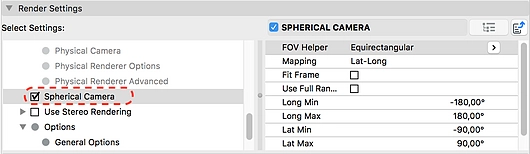
To create a 360° render in Archicad select the Detailed Render settings in the PhotoRendering Settings dialog. If you enable the Spherical Camera, a number of settings appear:
Graphisoft | 360° Renders
  • Field of View (FOV) Helper: This setting allows you to render an entire sphere (equirectangular) or only above the horizon line (Dome)
  • Mapping: This describes how the 360° image will be handled. The lat-long mapping (or equirectangular) setting is most commonly supported, however in some cases the cube map is required as it uses the six faces of a cube to map the shape.
  • Fit Frame and Use Full Image: The Fit Frame option stretches the region to fill the entire bitmap. Use Full Range will utilize an all-around view or if disabled only a portion that is defined by the specified view angles.
GRAPHISOFT Logo

Contate o fabricante

GRAPHISOFT

GRAPHISOFT Logo

Contate o fabricante

GRAPHISOFT

More from

GRAPHISOFT

Website Telefone

Contate o fabricante

GRAPHISOFT Logo

Contate o fabricante

GRAPHISOFT

Produtos Relacionados

View more related products »
How to Enjoy Faster Project Visualization with Real-Time Rendering

How to Enjoy Faster Project Visualization with Real-Time Rendering

Chaos
How to Create Animated GIFS with Archicad

How to Create Animated GIFS with Archicad

GRAPHISOFT
Contate-nos
