Ideal House is an AI-powered design platform for visualizing interior spaces, products, and materials. Its Room Visualizer SDK allows home brands and retailers to bring their product catalogs into room previews, so customers can consider each product alongside the furniture, finishes, and colors already in a space.
Customers can preview catalog products in their own room photographs or sample rooms, explore alternatives, and return to the merchant's product pages to continue shopping.
Bring the Product Catalog into the Room
The SDK combines AI and 3D with product imagery and dimensions to support product visualization. Its catalog connects the room preview to specific products, with details and available variants presented alongside the scene.
For furniture, customers can add and replace pieces, move them within the room, and rotate them to explore arrangements. A sofa, coffee table, and side table can be viewed together to consider how their forms and finishes work as a group.
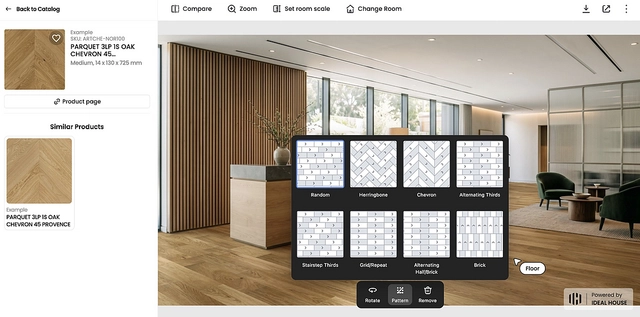
For surfaces, customers can switch products within the same room to compare finishes in context. Flooring previews can also include available laying patterns. Catalogs can cover categories such as furniture, flooring, wallpaper, tile, rugs, and wall art, with controls configured for each category.
Connect Visualization with Product Discovery
Product details and Similar Products help customers explore alternatives while viewing the room. Switching between products keeps the comparison grounded in the same setting. The Compare view shows the original room alongside the current design.
Links back to the merchant's product pages provide a route to specifications and the website's usual purchasing or sample-ordering process. The product, variant, and destination are checked as part of integration.
Prepare the Catalog and Website Integration
Catalog preparation starts with product identifiers, names, image links, product-page links, and the physical dimensions required for each category. Existing images and data are reviewed to identify missing information and assess their suitability for visualization.
The JavaScript SDK can introduce visualization entry points on product and collection pages. Implementation includes matching website products to the visualization catalog, configuring entry points, and testing the experience on desktop and mobile.
Merchants can review usage indicators such as entry-point exposure, visualizer opens, and product applications. Purchase or revenue attribution requires an agreed connection to commerce data. A hosted portal can also provide an initial catalog evaluation before website integration.
Explore Design Concepts with Generative AI
Ideal House also offers Furniture Try-On and Texture Replacer for concept exploration. Furniture Try-On uses room and furniture images to explore furnishing ideas. Texture Replacer uses a material reference to explore a new surface treatment within a photograph.
These tools generate concept images for early design discussions. Furniture proportions, apparent dimensions, pattern scale, and pattern repeats may vary in the generated result, particularly with patterned materials or detailed furniture. They help users explore a direction; physical dimensions and material samples should be checked separately.
The SDK supports a shopping workflow organized around a merchant's catalog. Generative AI tools support open-ended concept exploration. Either approach can be selected according to the task, and room previews should be reviewed alongside product specifications and physical samples before purchase.
For a shopper's view of the SDK workflow, see How to Help Customers Visualize Your Products on Your Website. To discuss a catalog and website integration, book a Visualizer demo.