-
Use
BIM presentation, project documentation review, design communication, on-site coordination, client and stakeholder collaboration -
Applications
Interactive exploration of BIM projects; review of linked 2D documentation and 3D models; access to building-element information; on-site project review and issue markup; sharing and publication of BIMx Hyper-models -
Characteristics
Multi-platform BIM viewer for desktop, mobile devices, web browsers, and Apple Vision Pro; interactive 3D navigation; BIM Hyper-models linking 3D models with 2D project documentation; model streaming; building-element metadata and associative labels; element visibility controls; configurable cut-plane colours; 3D model switching; accurate sun positioning; BIMx Issues; BIMx Model Transfer; website embedding -
Certification
BCF-compliant issue management
BIMx is an interactive software application developed by GRAPHISOFT that supports architects, engineers, construction teams, and clients by delivering:
- Mobile access
Run BIMx on mobile devices without special hardware to review designs and suggest changes on the go.
- Game-like experience
Explore and share designs with project stakeholders through an interactive, game-like navigation experience
- Complete project documentation
BIMx Hyper-models contain hyperlinks to the complete 2D project documentation, for easier access to corresponding datasheets.
- 2D and 3D visualization
Team members or clients not trained in reading 2D plans can understand the design intent with a 3D visualization.
- Digital documentation
BIMx provides access to up-to-date digital project documentation, reducing the need for paper prints.
- 3D models with metadata
Instantly access all building-element information, including fire ratings and manufacturer-specific properties.
- Model streaming
BIMx supports client engagement with model streaming technology that works like a computer game on projects of different scales.
- Connection to BIM databases
Facility managers and owners can access and integrate Facilities Management databases for streamlined maintenance using the BIM model
- BIMx Model Transfer Site
Upload BIMx Hyper-models to the BIMx Model Transfer site and share them through a simple web link. Visit the BIMx Model Transfer Site.
- Private BIMx Hyper-model sharing
Graphisoft Subscribers, SSA, and Forward users can create and share private BIMx hyper-models with selected customers and clients. Hyper-models can also be embedded on websites.
- Hidden 3D Elements
Improve client communication and collaboration with more interactive virtual models. Hide and unhide 3D elements or invert the current view to control model visibility. Multiple elements can be hidden by layers, layer folders, and layer combinations.
- BIMx on Apple Vision Pro
Explore BIMx projects in immersive spatial computing environments.
- Cut Plane Color Picker
Customize the 3D model’s representation by changing the color of cut surfaces. Corporate identity palettes can be inserted into the model.
- 3D Model Switch
Guide project collaborators through one continuous visualization journey. Toggle between different 3D models within a project while maintaining a consistent camera position and view setting, including across Design Options.
- BIMx Issues Feature
Use BIMx Issues to mark up any 2D or 3D views during on-site visits or off-site meetings. Issues are BCF compliant, so they stay trackable throughout the entire design process.
- Sign in for more BIMx features at no extra cost
Most previously Pro features are now available to everyone with a Graphisoft Account. Sign in to access additional features. Additional collaboration features are available through account-based licensing on mobile devices.
-
On-the-go access to information
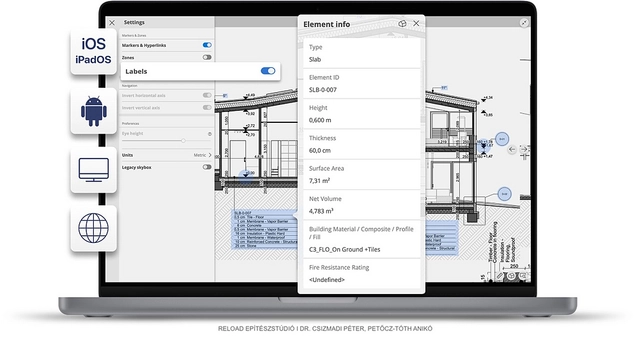
Access specifications and 3D element information directly from 2D layouts without switching between layout and 3D views. Associative labels provide easy access to relevant element information.
- Accurate Sun Positioning
Accurate Sun Positioning in BIMx simulates natural light conditions based on the sun’s position, supporting the evaluation of daylight and environmental conditions during the design process.
-
Embedded BIMx Web
BIMx Hyper-models can be embedded directly into websites using an HTML code snippet generated from the “Embed Hyper-model” window. Embedded models can be accessed and explored through a web browser without requiring a separate application.
Models stored with private visibility can also be embedded for viewing without allowing external users to download them. Explore how to embed BIMx Hypermodels.
Explore GRAPHISOFT's product catalog or visit their website for more information.