How to Create 360° Renders | GRAPHISOFT
  1. ArchDaily
  2. Productos
  3. Renders / Animación 3D
  4. How to Create 360° Renders

How to Create 360° Renders | GRAPHISOFT

  • Disponible en

  • Uso

    Architectural renders
  • Aplicaciones

    360° renders
  • Características

    Easy to use, adjustable settings
Este producto ha sido guardado en tu carpeta: Mis productos descargados
GRAPHISOFT Logo

Contacta al fabricante

GRAPHISOFT

GRAPHISOFT Logo

Contacta al fabricante

GRAPHISOFT

More from GRAPHISOFT

Sitio Web Teléfono

Más sobre este producto

360° renders provide an immersive render experience to communicate architectural spaces in the round. The Cinerender engine in Archicad is a Spherical Camera that allows the production of high-quality 360° renders.

The 360° renders can be embedded as gifs into websites combined with BIMx Webviewer functions or easily into most social media platforms.

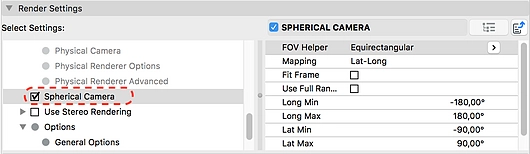
To create a 360° render in Archicad select the Detailed Render settings in the PhotoRendering Settings dialog. If you enable the Spherical Camera, a number of settings appear:
Graphisoft | 360° Renders
  • Field of View (FOV) Helper: This setting allows you to render an entire sphere (equirectangular) or only above the horizon line (Dome)
  • Mapping: This describes how the 360° image will be handled. The lat-long mapping (or equirectangular) setting is most commonly supported, however in some cases the cube map is required as it uses the six faces of a cube to map the shape.
  • Fit Frame and Use Full Image: The Fit Frame option stretches the region to fill the entire bitmap. Use Full Range will utilize an all-around view or if disabled only a portion that is defined by the specified view angles.
GRAPHISOFT Logo

Contacta al fabricante

GRAPHISOFT

GRAPHISOFT Logo

Contacta al fabricante

GRAPHISOFT

More from

GRAPHISOFT

Sitio Web Teléfono

Contacta al fabricante

GRAPHISOFT Logo

Contacta al fabricante

GRAPHISOFT

Productos Relacionados

Ver mas productos relacionados »
How to Enjoy Faster Project Visualization with Real-Time Rendering

How to Enjoy Faster Project Visualization with Real-Time Rendering

Chaos
How to Create Animated GIFS with Archicad

How to Create Animated GIFS with Archicad

GRAPHISOFT
Cotizar
